



Before I start this article, let’s set the record straight. I’m a long time Aperture user… I started with Aperture the first day it was released. My Aperture library tracks my evolution with digital photography and it was one of my favorite tools for years.
A while back I decided to switch from Aperture to Lightroom. I’ve always used Photoshop in conjunction with Aperture for my Panoramic work and advanced retouching.
Recently, Ive been absolutely inundated with people asking me how to move their libraries from Aperture into Lightroom. I get these questions as I taught many people a lot about Aperture as one of the authors of the official Apple Pro Training Series on Aperture. In fact I even produced a lynda.com class on the topic.
DISCLAIMER: This article isn’t about why you should move or if you should wait. Its merely about HOW to move your stuff.
How to Move Files from Aperture to Lightroom
In this example I am moving my largest Aperture library. The steps aren’t hard, but with a large library they can take some time. My advice is don’t rush and make sure you backup both your Aperture library and Lightroom catalog before you start.
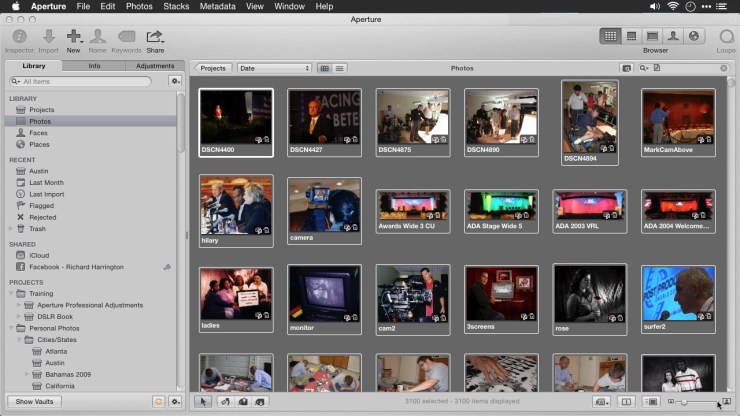
Things to Do First in Aperture
Before you move several thousand files over into Lightroom, its a good idea to do a little housekeeping. Ideally the move you make will be a one time move, so getting things right is important up front.

Check For Any Offline Files
I tend to use a Referenced Library in Aperture (one where all the images were on a drive or drives instead of just pulled into the Aperture Library). This was easier for me to organize and backup. In any case though the same advice holds true for managed libraries. Get everything in sync up front.
- Launch Aperture and select the Library tab.

- From Your Library choose Photos to see all your photos in the whole library.
- Click the Filter button near the search field to filter your view.
- In the Filter dialog choose Add Rule and select File Status.

- Check the box next to File Status and set it to Offline to see all files that seem to be missing or were moved and need to be relocated.

Reconnect Offline Files
Knowing that files are offline is only half the battle. You now need to connect those files back so they can be referenced and moved. Select the images that show offline in the Browser.
- Select all images which show as Offline. This should be all images shown if you use the Filtered view we set up previously.
- Choose File > Locate Referenced File.
- In the new dialog box, examine images and their previous path. You can also note the fie name for missing files and search at the Finder level manually if you have problems.
- Select the drive and base folder where you think the files live. Aperture will search to find the missing files.
- When a matching thumbnail is shown, click the Reconnect All button to reconnect all files that existed in the former directory to reconnect them
- Continue until all of the remaining files are reconnected. You may need to search multiple drives if youve spread them out over many hard drives. Mine are all on one Drobo 5D so theyre easy to find (and backed up to a second Drobo and to the Cloud).
- When all files are connected Click Done.
Get Big Previews
Aperture and Lightroom process images differently not a surprise except its important to note that the bulk of your Raw adjustments will be lost. But Lightroom can import the Aperture previews for reference or printing if you create them first.
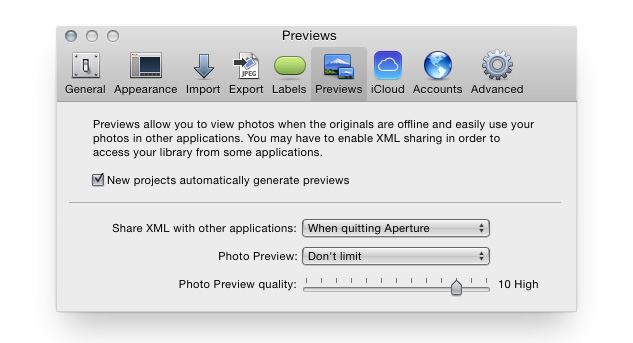
- In Aperture choose Aperture > Preferences.
- Choose the Previews tab
- Set Photo Preview to Don’t Limit for Full Size previews. You can also chose Half Size if space is a concern.
- Set the Photo Preview quality slider to High ( value of 1012).
- Close the Preferences dialog.
- Hold down the Option key and choose Photos > Generate Preview to make fresh Preview files.
- A status bar appears as the process is loaded indicating Scheduling previews for rendering. When it completes it will disappear.
- At the Bottom of the Screen Click the Activity Monitor icon (a spinning gear) to track progress. You can also choose Window > Show Activity to see progress.

- When the Previews complete you can close the Activity Monitor. This process can take some time for a large library.
Confirm Which Library You are Moving
Its quite possible that you have more than one Aperture library on your system. Make sure you know its exact location on your drive.

- Choose File > Switch to Library > Other/New
- Click on the Date Modified column to sort from Newest to Oldest.
- Take note of the library at the top. It should also have the phrase (current default) next to its name.
- At the bottom of the dialog, not the full file path. Write this down for good measure.
- Close this dialog without choosing a new library using the close button in the upper left corner of the window.

Make the Move to Lightroom
In order to move your Aperture (or iPhoto) library into Lightroom, you’ll need to have Lightroom 5.7 or later installed. To check which version you have choose Lightroom > About Adobe Photoshop Lightroom (Mac) or File > About Adobe Photoshop Lightroom (Windows).

What Imports and What Doesnt
Before we bring files in, lets review what will translate into Lightroom. This is an important limitation to review.
The following items should import correctly:
- Flags
- Star Ratings
- Keywords
- GPS Data
- Metadata that can be entered in the Info panel in Aperture
- Aperture project/folder/album hierarchy will be mapped as closely as possible into Lightroom collection sets and collections
- Import Full size previews from Aperture/iPhoto provided that they are up-to-date
- Aperture Versions will translate into Virtual Copies in Lightroom (without adjustments)
The following items should import but are remapped to keywords:
- Faces (face naming tags are mapped to keywords)
- Rejects (files designated as Rejects in Aperture will be imported into Collections > From Aperture > Photos Rejected in Aperture)
- Color Labels (Color Labels are mapped to keywords: Red, Orange, etc, including support for custom label names)
- Stacking ( Stacks information is mapped to keywords: Aperture Stack 1, Aperture Stack 2, etc)
The following information is ignored and cannot be imported into Lightroom:
- Image adjustments
- Smart Albums
- Face Tag Region of Interest (face naming tags are mapped to keywords)
- Any kind of creation (books, web galleries, etc) other than the collections that correspond to them
Start the Importer
To import your Aperture library into Lightroom, you’ll use a pre-installed plugin. If you skipped the steps on preparing your Aperture library, you must go back to the start of this article and read those first (otherwise beware of possible errors).
- Choose File > Plug-in Extras > Import from Aperture Library.
- A new dialog opens and Lightroom scans for existing Aperture libraries.

- When the scanning is complete click the first Select button.
- Navigate to the Aperture library you want to import. You earlier learned how to check which Aperture library was the current one in use so navigate to that file and choose it.
- Click the second select button to choose a folder where to store the copied images.
- Verify the number of files to be copied and the disk space needed.

- If you don’t have enough disk space consider switching to a multi-drive solution like Drobo.

Set Your Options
Before you import, there are important options to choose. These options will better control what is imported into Lightroom.
- Choose File > Plug-in Extras > Import from Aperture Library.
- Check the first box to import full sized previews into Aperture. Full size means use the full is made by Aperture so be sure to check the previews or rebuild them in Aperture first as we previously discussed.
- Leave the second box checked so only keywords that have been applied are imported.
- The middle section lets you convert color labels and stacks into keywords. I recommend using both of these options.
- The last two options are important. They deal with referenced Aperture libraries.
- If you want to leave files that are referenced by Aperture in their same location, check this box. This will leave all referenced files in their current place and simply add them to Lightroom.
- If you want to duplicate and copy referenced files so a new copy is made, uncheck this box. This will make sure that Aperture has its copy and Lightroom works with a different copy.
- All managed files will be copied automatically using the location you set earlier.
- I recommend checking to place imported Previews with the originals so Autostacking works best in Lightroom and files stay organized
6. When done, Click OK to store the options.
Start the Import
I strongly recommend verifying that you have enough disk space to hold the copied files. Its also a great idea to backup both your Aperture library and Lightroom catalog if you want to be bulletproof against errors. If youre running this on a laptop, be sure to plug the computer in so you don’t have a dead battery part way through.
Once youre ready to import, you can click the Import button to start the process.
Once you click the Import button, Lightroom starts to process your files. Theyll be added into a Collection named From Aperture. When the import is finished, you may want to clean this folder up by rearranging things a bit. It should be a close match to your Aperture structure.
Conclusion
I found the process of moving my Aperture library over to be easy albeit a bit time consuming. The extra processing and time was on the Aperture side to ensure that all files were online and that I had full-sized previews for adjusted images.
Once I invoked the import, the process was pretty straight-forward and took only about as long as importing the same number of images from a hard drive or memory card. Id personally transitioned from Aperture almost completely about a year ago. Having the ability to bring over my complete library was the final step to making sure no good images were left behind.
For those of you on the fence waiting for the new Apple Photos app, just file this information away for the future. If youre happy in Aperture stay. If you like the new app when its released, use it. For me, Im quite happy for the move as I see a substantial jump in quality due to the way that Adobe processes its Raw files.




I’d start this process yesterday if I weren’t already devoted to Lightroom. Aperture is just so . . . Apple when it comes to photo management. While I love most all things Apple, Lightroom is the master at understanding how photographers work and think. Great post for those who are weighing the move. My advice: Move STAT! Thanks, Rich.
So if I have a RAW file in Aperture and a set of adjustments, when I import into LR, do I now have the original, un-edited RAW file and a large preview that reflects the adjustments? Do they show up as separate files in LR? If I lose all my adjustments, I’ll probably just keep running Aperture as a legacy program for those photos, unless Apple stops supporting it or the new Photos shows up. (Assuming I switch over to Yosemite given the horror stories about people with older computers who try to upgrade OS X.)
Aperture adjustments don’t show up in Lightroom. But Lightroom’s Raw engine is 3-5 times better in my opinion. The High-quality JPEGs are fine to print… if you follow directions in the post they are 100% quality full size files. These are fine for printing and exporting. The benefit of moving to Lightroom is the ability to redevelop photos you want to improve and to have all your images in one library and not two.
Thanks. The better RAW engine is why I switched from Aperture. Now if LR would just make the publish features as easy as Aperture.
I agree. I do find the book module in aperture to be awesome and the slideshows were easier too.
Social media is easier, too. Not as many plug-ins, such as 500px, but it was so easy to drag a couple of pictures onto my Facebook or Flickr wall, as opposed to the extra steps to creat a Collection in LR.
I have been trying to do this all day but do not find anything in Aperture that is a Filter button? I can’t proceed with this without that button. HELP please and thank you
Kind Regards, Lori “To look at a thing is very different from seeing it.” – Oscar Wilde
Try watching the video in bedded in the post. It will give you a better idea where the buttons are. The filter button is in the upper right area near the search box when you are in photos view.
One of the superior pieces i’ve read this week.
I have yosemite and now I can not even open aperture. So to switch means doing it sight unseen. Any suggestions for this poor soul?
Download aperture updates… it runs under yosemite
Thanks for the helpful article. Any idea why my import aperture selection is greyed out under the Import PlugIns extras selection in Lightroom 5.7?
thanks so much
Stephen
May not be properly installed…. try running the update again with Lightroo closed.
Very helpful article. However, I’m stymied at the dialog of the import plug-in where I’m asked to choose the Aperture Library to import. I have only one, under Pictures, and nothing happens when I choose it.
/Users/Daja/Desktop/Screen Shot 2015-02-28 at 5.26.07 PM.zip
Any suggestions? Thank you for any assistance.
Make sure you’ve repaired your aperture library using the earlier steps
I followed your steps, corrected the previews and located the sole Aperture Library (under Pictures). I can open that Library with Control+Click but not with the plugin, thus nothing gets chosen to import.
The steps I listed work. I’ve tested them 5 times. Be sure to repair your library the way we cover up front. Then make sure Lightroom is up to date and follow the import steps. Do them in the exact order and start at the beginning.
Have followed instructions but once import is finished I get a window with a list of images not imported – i.e. them all.
Any idea what is going on?
Make sure those images are connected in Aperture. Follow the full steps of repair in Aperture first and making sure all referenced images are connected.
I have the same problem. My Aperture Library has 65K photos. I’ve read many posts at various sites–the only consistent solution appears to be breaking up your library into smaller libraries and then running the Lightroom importer plug-in.
Best guide I have seen to date, thank you. I’ve tried doing this with iPhoto but LR 5.7 locks up at 0% overnight after the import dialog boxes are completed. Have run all 4 repair options when starting iPhoto but still get a locked up program. I also own a copy of Aperture. Would I be better off switching from iPhoto to Aperture and then doing the import? Also, is there a workflow to turn off iPhoto and have lightroom handle imports and using the Apple iCloud for iPhone and iPads, or am I asking for too much? I am… Read more »
Any tips on the error ‘Failed to obtain image version information from Aperture library’? Also, if I understand things correctly, do I leave the last option unchecked if I want to leave the original file in Aperture untouched and a new copy created for Lightroom? Thanks.
Make sure you repair the Aperture Library using the steps covered before importing.
The last option is just related to creating a reference image of the Aperture adjustments and locating next to to file on your drive for autostacking.
Is there any way to import aperture folder by folder please? thx
Nope… but you can go into Aperture and split a folder into its own library then import that.
I already imported my library without previews, is there a way to add in the previews without starting from scratch again? Thanks
Nope… the wizard just works one way.
When the “import from Aperture” dialog box pops up in Lightroom it finds and checks my aperture library — that’s fine. But in the “copy image/video files:” line it has a lightroom catalog that is on my main hard drive where there isn’t enough room. So I created another catalog on an external drive — but when I hit the select button it shows that catalog greyed out — can’t select it. My Aperture library I’m trying to import is quite large 3TB + and the new LR catalog is on a 6 TB drive so there should be plenty… Read more »
I imported a very large library with no issues… but if you face these, first make sure you repair the library and reconnect everything as I outlined.
Just did this recently, and the process worked a little too well. All of the culling I had done in each project was negated when moving to Lightroom. Any idea what I could do to fix this? For example, one of my Projects with 216 photos in Aperture migrated to be a 1026 photo Collection in Lightroom. I may have started with that many photos in Aperture originally but had then culled it down to the 216. All of my project/collections are like that. Any help is much appreciated!!! I’m seriously hoping I don’t have to cull through years of… Read more »
Well, if images are adjusted, youmight be getting a reference copy. Also empty trash in Aperture and make sure imnages were deleted and not just rejected
Hi Richard, excellent post – followed it to the letter. But now the Import from Aperture Progress meter has been stuck at 0% for several hours. How long does it take to import a library of 36,000 pictures, and is it normal that for a long time nothing happens? Do you recommend breaking up such a large library into smaller Aperture libraries before importing to LR?
Haven’t seen that happen. Make sure you look over the library and that everything is linked first. Also be sure to repair permissions on your drive. If that doesn’t work, try a smaller library.
Thank you. My library was not a referenced library, so all photos are in the Aperture folder. And the drive I’m transferring the pics to is a brand new external 2TB drive with enough space. Will try your last suggestion and break up the library into smaller ones.
Turns out that I had a duplicate project name, which LR didn’t know what to do with, that’s why it got hung up. After fixing that, the import worked beautifully, except for one thing: I now have thousands of folders, each labeled with a date, in the folder section of LR. That makes finding where the original file for any picture is almost impossible, since I didn’t keyword every image. I had hoped to use the folders section as my overarching organizing space, not the collections section. Any thoughts/suggestions? I’m thinking of redoing it all and importing one project at… Read more »
Look in the Options area of importer… you can tell it how to handle. You can also tell it to add a keyword to each item based on project to make that easier to sort. Make sure you watch the videos and don’t just read the articles.
hi there, thanks for this nice tutorial.
I am finally making the move from aperture to lightroom.
I am wondering since I do not have much space available on my current drive, may I just reference the pictures present in aperture library to lightroom? I mean it seems like all files will be copied by lightroom using this plugin is that correct? Or can I try to tell aperture that they are referenced in it s own library so that when we use lightroom import it will keep referenced files right where they are?
thanks
For best results do a copy. Folder structures very different. Get a new drive and target
Best tutorial I have found…thank you! I think I jumped the gun and ran the plugin without understanding the “referenced vs managed” dynamic. To be clear, you recommend a “managed” approach. With managed, a copy is created, which has the benefit of enabling both Aperture and Lightroom independently. This way, in the future, I can still locate edits to photos done in Aperture, and take the steps to moving them to Lightscape. My import to Lightscape took 24-hours using the referenced approach. Do you recommend I re-do this process unchecking the location box? Should I first erase the work that… Read more »
There is not real difference… just how you have already been working in Aperture. Make sure to follow the steps to generate full-res reference JPEGS, then do the migration.
Thank you Richard. The downside to not taking this step is that you lose adjustments made to RAW images in Aperture…but what if I have not made many such adjustments? Also, is there a way to complete this process step after the import was completed? Another question: I notice the brief 1-2 second preview of the image (happens in both Aperture and Lightscape), followed by the more dull RAW image. My understanding is the initial image is the camera’s processing, but the eventual image is the actual RAW image. Is there a way to use RAW, but to automatically adjust… Read more »
Shoot raw because you want control. You can also Riley make a priest and apply those to match camera looks
Thank you, thank you, thank you!! That was the best set of instructions that I have ever seen on anything related to computers. You did not miss a single step, explained it amazing well with video, pictures and exact wording. I could never have done this on my own; I had no clue I had to prepare my Aperture library so much. Transfer of 50,000 pics went seamlessly. Now if I can just figure out how to use lightroom. Would love other lessons that are as fantastically presented as this was.
I just imported my first test Aperture library into LR using the plug-in. I have a managed Aperture library. I followed the instructions to regenerate to get big previews before I imported. The import went well, except for one thing – the big preview jpeg is not in the same collection as the original. The preview jpegs are in the same folder as the original, but when LR copied my Aperture project structure into LR collections, it didn’t put the preview jpegs there too. I need them together in the collections because that is how I will find and work… Read more »
You an make smart collections… or sort… or file a feature request with Adobe
Thanks, Rich. LR actually put them all in a collection for me (along with the raw they correspond to), so they are at least segregated, which will make the manual sort easier. Thank you for taking the time to answer my question.
I’m sorry that this part doesn’t make sense to me. It says adjustments are ignored, but then it says that with full-sized previews, you have those adjustments.
I’m sure it’s written well, I’m just not smart with this stuff.
I don’t need to know WHAT the adjustments were, but I’d ideally have the edited version and the original version stacked together.
Thanks in advance for clarifying…
Your adjustments do not come over as a live editable effect. A preview file with the effects applied is moved over.
Precisely What I get of my adjustments in LR ? What do you intend with “Previews” will be printable ? What exactly is a Virtual Copy ? And how a version in Aperture Became a Virtual Copy in LR ? The only explanation I can think is: Version are created on the fly by aperture: not importable. When the version is imported, is the preview which is acquired and stored as an (unmodifiable) virtual copy associated to the RAW (what you can print of preview from aperture). Virtual Copy are equivalent of versions, you can have more for each RAW.… Read more »
You lose all of Apertures adjustments to the raw file when you move to Lightroom. The organization and files move. The high quality preview (if you follow my steps) will be the same resolution as the original. These have nothing t do with virtual copies.
Hi Richard, Am i understanding correctly that Lightroom will import 2 photos for every Image ( including versions) in aperture . One photo will be the original ( or unadjusted version of the original ) , the 2nd one will be a full sized preview of the adjusted original . i.e this means that Lightroom treats the preview image as its own jpg photo and the aperture preview jpg has nothing to do with LR previews ? Will these be preview jpgs be contained in the same LR folder , and how would the previews be labelled/filenamed ? thanks a… Read more »
You have to tell Aperture to generate high-quality previews.
The will have a similar name. You can stack in Lr to combine them.
The previews should be in the same folder when you import.
So if I have a RAW file in Aperture and a set of adjustments, when I import into LR, do I now have the original, un-edited RAW file and a large preview that reflects the adjustments? Do they show up as separate files in LR? If I lose all my adjustments, I’ll probably just keep running Aperture as a legacy program for those photos, unless Apple stops supporting it or the new Photos shows up. (Assuming I switch over to Yosemite given the horror stories about people with older computers who try to upgrade OS X.)
Aperture adjustments don’t show up in Lightroom. But Lightroom’s Raw engine is 3-5 times better in my opinion. The High-quality JPEGs are fine to print… if you follow directions in the post they are 100% quality full size files. These are fine for printing and exporting. The benefit of moving to Lightroom is the ability to redevelop photos you want to improve and to have all your images in one library and not two.
Thanks. The better RAW engine is why I switched from Aperture. Now if LR would just make the publish features as easy as Aperture.
I agree. I do find the book module in aperture to be awesome and the slideshows were easier too.
Social media is easier, too. Not as many plug-ins, such as 500px, but it was so easy to drag a couple of pictures onto my Facebook or Flickr wall, as opposed to the extra steps to creat a Collection in LR.
I have been trying to do this all day but do not find anything in Aperture that is a Filter button? I can’t proceed with this without that button. HELP please and thank you
Kind Regards, Lori “To look at a thing is very different from seeing it.” - Oscar Wilde
Try watching the video in bedded in the post. It will give you a better idea where the buttons are. The filter button is in the upper right area near the search box when you are in photos view.
Very helpful article. However, I’m stymied at the dialog of the import plug-in where I’m asked to choose the Aperture Library to import. I have only one, under Pictures, and nothing happens when I choose it.
/Users/Daja/Desktop/Screen Shot 2015-02-28 at 5.26.07 PM.zip
Any suggestions? Thank you for any assistance.
Make sure you’ve repaired your aperture library using the earlier steps
I followed your steps, corrected the previews and located the sole Aperture Library (under Pictures). I can open that Library with Control+Click but not with the plugin, thus nothing gets chosen to import.
The steps I listed work. I’ve tested them 5 times. Be sure to repair your library the way we cover up front. Then make sure Lightroom is up to date and follow the import steps. Do them in the exact order and start at the beginning.
I’d start this process yesterday if I weren’t already devoted to Lightroom. Aperture is just so . . . Apple when it comes to photo management. While I love most all things Apple, Lightroom is the master at understanding how photographers work and think. Great post for those who are weighing the move. My advice: Move STAT! Thanks, Rich.
Is there any way to import aperture folder by folder please? thx
Nope… but you can go into Aperture and split a folder into its own library then import that.
Thanks for the helpful article. Any idea why my import aperture selection is greyed out under the Import PlugIns extras selection in Lightroom 5.7?
thanks so much
Stephen
May not be properly installed…. try running the update again with Lightroo closed.
Have followed instructions but once import is finished I get a window with a list of images not imported – i.e. them all.
Any idea what is going on?
Make sure those images are connected in Aperture. Follow the full steps of repair in Aperture first and making sure all referenced images are connected.
One of the superior pieces i’ve read this week.
I have yosemite and now I can not even open aperture. So to switch means doing it sight unseen. Any suggestions for this poor soul?
Download aperture updates… it runs under yosemite
Any tips on the error ‘Failed to obtain image version information from Aperture library’? Also, if I understand things correctly, do I leave the last option unchecked if I want to leave the original file in Aperture untouched and a new copy created for Lightroom? Thanks.
Make sure you repair the Aperture Library using the steps covered before importing.
The last option is just related to creating a reference image of the Aperture adjustments and locating next to to file on your drive for autostacking.
Best guide I have seen to date, thank you. I’ve tried doing this with iPhoto but LR 5.7 locks up at 0% overnight after the import dialog boxes are completed. Have run all 4 repair options when starting iPhoto but still get a locked up program. I also own a copy of Aperture. Would I be better off switching from iPhoto to Aperture and then doing the import? Also, is there a workflow to turn off iPhoto and have lightroom handle imports and using the Apple iCloud for iPhone and iPads, or am I asking for too much? I am… Read more »
I have the same problem. My Aperture Library has 65K photos. I’ve read many posts at various sites–the only consistent solution appears to be breaking up your library into smaller libraries and then running the Lightroom importer plug-in.
Hi Richard, excellent post – followed it to the letter. But now the Import from Aperture Progress meter has been stuck at 0% for several hours. How long does it take to import a library of 36,000 pictures, and is it normal that for a long time nothing happens? Do you recommend breaking up such a large library into smaller Aperture libraries before importing to LR?
Haven’t seen that happen. Make sure you look over the library and that everything is linked first. Also be sure to repair permissions on your drive. If that doesn’t work, try a smaller library.
Turns out that I had a duplicate project name, which LR didn’t know what to do with, that’s why it got hung up. After fixing that, the import worked beautifully, except for one thing: I now have thousands of folders, each labeled with a date, in the folder section of LR. That makes finding where the original file for any picture is almost impossible, since I didn’t keyword every image. I had hoped to use the folders section as my overarching organizing space, not the collections section. Any thoughts/suggestions? I’m thinking of redoing it all and importing one project at… Read more »
Look in the Options area of importer… you can tell it how to handle. You can also tell it to add a keyword to each item based on project to make that easier to sort. Make sure you watch the videos and don’t just read the articles.
Thank you. My library was not a referenced library, so all photos are in the Aperture folder. And the drive I’m transferring the pics to is a brand new external 2TB drive with enough space. Will try your last suggestion and break up the library into smaller ones.
I already imported my library without previews, is there a way to add in the previews without starting from scratch again? Thanks
Nope… the wizard just works one way.
Just did this recently, and the process worked a little too well. All of the culling I had done in each project was negated when moving to Lightroom. Any idea what I could do to fix this? For example, one of my Projects with 216 photos in Aperture migrated to be a 1026 photo Collection in Lightroom. I may have started with that many photos in Aperture originally but had then culled it down to the 216. All of my project/collections are like that. Any help is much appreciated!!! I’m seriously hoping I don’t have to cull through years of… Read more »
Well, if images are adjusted, youmight be getting a reference copy. Also empty trash in Aperture and make sure imnages were deleted and not just rejected
Best tutorial I have found…thank you! I think I jumped the gun and ran the plugin without understanding the “referenced vs managed” dynamic. To be clear, you recommend a “managed” approach. With managed, a copy is created, which has the benefit of enabling both Aperture and Lightroom independently. This way, in the future, I can still locate edits to photos done in Aperture, and take the steps to moving them to Lightscape. My import to Lightscape took 24-hours using the referenced approach. Do you recommend I re-do this process unchecking the location box? Should I first erase the work that… Read more »
There is not real difference… just how you have already been working in Aperture. Make sure to follow the steps to generate full-res reference JPEGS, then do the migration.
Thank you Richard. The downside to not taking this step is that you lose adjustments made to RAW images in Aperture…but what if I have not made many such adjustments? Also, is there a way to complete this process step after the import was completed? Another question: I notice the brief 1-2 second preview of the image (happens in both Aperture and Lightscape), followed by the more dull RAW image. My understanding is the initial image is the camera’s processing, but the eventual image is the actual RAW image. Is there a way to use RAW, but to automatically adjust… Read more »
Shoot raw because you want control. You can also Riley make a priest and apply those to match camera looks
hi there, thanks for this nice tutorial.
I am finally making the move from aperture to lightroom.
I am wondering since I do not have much space available on my current drive, may I just reference the pictures present in aperture library to lightroom? I mean it seems like all files will be copied by lightroom using this plugin is that correct? Or can I try to tell aperture that they are referenced in it s own library so that when we use lightroom import it will keep referenced files right where they are?
thanks
For best results do a copy. Folder structures very different. Get a new drive and target
I just imported my first test Aperture library into LR using the plug-in. I have a managed Aperture library. I followed the instructions to regenerate to get big previews before I imported. The import went well, except for one thing – the big preview jpeg is not in the same collection as the original. The preview jpegs are in the same folder as the original, but when LR copied my Aperture project structure into LR collections, it didn’t put the preview jpegs there too. I need them together in the collections because that is how I will find and work… Read more »
You an make smart collections… or sort… or file a feature request with Adobe
Thanks, Rich. LR actually put them all in a collection for me (along with the raw they correspond to), so they are at least segregated, which will make the manual sort easier. Thank you for taking the time to answer my question.
When the “import from Aperture” dialog box pops up in Lightroom it finds and checks my aperture library — that’s fine. But in the “copy image/video files:” line it has a lightroom catalog that is on my main hard drive where there isn’t enough room. So I created another catalog on an external drive — but when I hit the select button it shows that catalog greyed out — can’t select it. My Aperture library I’m trying to import is quite large 3TB + and the new LR catalog is on a 6 TB drive so there should be plenty… Read more »
I imported a very large library with no issues… but if you face these, first make sure you repair the library and reconnect everything as I outlined.
Hi Richard, Am i understanding correctly that Lightroom will import 2 photos for every Image ( including versions) in aperture . One photo will be the original ( or unadjusted version of the original ) , the 2nd one will be a full sized preview of the adjusted original . i.e this means that Lightroom treats the preview image as its own jpg photo and the aperture preview jpg has nothing to do with LR previews ? Will these be preview jpgs be contained in the same LR folder , and how would the previews be labelled/filenamed ? thanks a… Read more »
You have to tell Aperture to generate high-quality previews.
The will have a similar name. You can stack in Lr to combine them.
The previews should be in the same folder when you import.
Thank you, thank you, thank you!! That was the best set of instructions that I have ever seen on anything related to computers. You did not miss a single step, explained it amazing well with video, pictures and exact wording. I could never have done this on my own; I had no clue I had to prepare my Aperture library so much. Transfer of 50,000 pics went seamlessly. Now if I can just figure out how to use lightroom. Would love other lessons that are as fantastically presented as this was.
I’m sorry that this part doesn’t make sense to me. It says adjustments are ignored, but then it says that with full-sized previews, you have those adjustments.
I’m sure it’s written well, I’m just not smart with this stuff.
I don’t need to know WHAT the adjustments were, but I’d ideally have the edited version and the original version stacked together.
Thanks in advance for clarifying…
Your adjustments do not come over as a live editable effect. A preview file with the effects applied is moved over.
Precisely What I get of my adjustments in LR ? What do you intend with “Previews” will be printable ? What exactly is a Virtual Copy ? And how a version in Aperture Became a Virtual Copy in LR ? The only explanation I can think is: Version are created on the fly by aperture: not importable. When the version is imported, is the preview which is acquired and stored as an (unmodifiable) virtual copy associated to the RAW (what you can print of preview from aperture). Virtual Copy are equivalent of versions, you can have more for each RAW.… Read more »
You lose all of Apertures adjustments to the raw file when you move to Lightroom. The organization and files move. The high quality preview (if you follow my steps) will be the same resolution as the original. These have nothing t do with virtual copies.